Computer & Desktop Repair in Azamgarh Done Properly, Explained Clearly
From a PC that won’t power on to a laptop with a dead motherboard, Uttam Infotech diagnoses the real fault, tells you what it will take to fix it, and only then starts the repair. Visit us at Kartalpur, near Shiva Hospital, or send your problem on WhatsApp.
A Local Computer Repair Shop in Azamgarh You Can Talk To
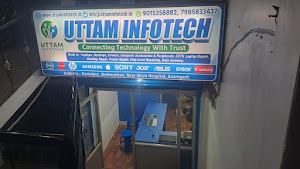
Uttam Infotech is a computer sales and service centre at Kartalpur, Brahmshtan, near Shiva Hospital in Azamgarh. We work on desktops, laptops, all-in-ones and the accessories around them, for students, home users, shops and offices across the city.
Most people who walk in don’t need jargon. They need to know whether the machine can be fixed, roughly what it will cost, and how long it will take. That is how we work: inspect first, explain the fault in plain language, give you the options, and repair only after you agree.
Because we also sell computers and refurbished laptops, we understand parts, compatibility and what is worth upgrading versus replacing. That helps us give honest advice, especially on older machines.
How we handle every repair
- Diagnosis before work. We find the actual cause, not just the symptom.
- Estimate before repair. You approve the cost before we start.
- Component-level fixes where possible, instead of replacing whole boards.
- Your data respected. We advise on backup before any formatting.
Computer and Laptop Problems We Fix Every Week
Recognise one of these? Here is what usually causes it and how a computer technician in Azamgarh like us would approach it.
Not turning on / no display
Fans spin but the screen stays black, or nothing happens at all when you press the power button.
Usual causes: failed SMPS or adapter, faulty RAM, loose display cable, or a motherboard power section fault.
Very slow or hanging
Takes minutes to boot, freezes while opening files, or the browser crawls even with a good connection.
Usual causes: ageing hard disk, too little RAM, malware, or a cluttered Windows installation.
Overheating & sudden shutdown
The machine gets hot, the fan is loud, and it switches off during work or games.
Usual causes: dust-blocked vents, dried thermal paste, a failing fan, or a power delivery issue.
Broken or flickering screen
Lines on the display, dim backlight, cracked panel, or a laptop screen that flickers when the lid moves.
Usual causes: damaged panel, worn display cable, backlight circuit fault, or GPU issues.
Windows errors & blue screen
Stuck on “preparing automatic repair”, repeated blue screens, or updates that never finish.
Usual causes: corrupted system files, bad drivers, a failing drive, or faulty memory.
Battery, charging & keyboard issues
Laptop not charging, battery draining fast, dead keys or a loose charging port.
Usual causes: worn battery, faulty adapter or DC jack, charging IC fault, or liquid spill.
Complete Computer & Desktop Repair in Azamgarh
Desktop PCs are easier to open than laptops, which makes them very repairable, but it also means faults can come from many places: the power supply, the board, the memory, the drive or simply a loose connection. Our desktop repair work starts with testing each part in isolation so we replace only what has actually failed.
We handle branded desktops, assembled PCs and all-in-ones used at home, in shops, cyber cafés and offices across Azamgarh.
- SMPS replacement
- No display fix
- Restart loops
- Beep codes
- All-in-one repair
Power & SMPS faults
Testing and replacing failed power supplies that cause dead PCs or random restarts.
No display & boot problems
Checking RAM, graphics output, BIOS settings and board health when the screen stays blank.
Hard disk & SSD faults
Diagnosing clicking, undetected or failing drives, with data rescue first where needed.
Ports, USB & front panel
Fixing dead USB ports, audio jacks, power buttons and front-panel connections.
Computer hardware repair
Graphics cards, cooling fans, CMOS battery and other part-level replacements.
Laptop Repair in Azamgarh for All Major Brands
Laptops pack everything into a tight space, so a single failed part (a hinge, a charging jack, a keyboard) can make the whole machine hard to use. We repair HP, Dell, Lenovo, Acer, Asus and other common brands, with care taken over clips, screws and ribbon cables that break easily when opened carelessly.
If a part needs replacing, we explain the options available for your model and what each one means for cost and lifespan. For model-specific details, see our dedicated laptop repair in Azamgarh page.
Screen & display replacement
Cracked panels, lines, dim backlight and flickering caused by worn display cables.
Keyboard & touchpad
Replacement of dead or spill-damaged keyboards and unresponsive touchpads.
Battery, adapter & charging port
Battery swaps, adapter checks and DC jack repair for laptops that won’t charge.
Hinge & body repair
Fixing broken hinges and cracked hinge mounts before they damage the screen.
Liquid damage
Cleaning and board-level inspection after spills. Switch off and bring it in quickly.
Motherboard & Chip-Level Repair in Azamgarh
When a motherboard fails, many service centres simply quote a new board, which is often the most expensive part of the computer and sometimes unavailable for older models. Chip-level repair means tracing the fault to the specific component on the board and replacing or reworking just that part.
This kind of motherboard repair can bring a dead laptop or desktop back to life for considerably less than a board swap. Not every board is repairable, and we will tell you honestly after diagnosis whether it is worth attempting.
- Dead board diagnosis
- Power IC
- Charging circuit
- BIOS issues
- Short circuit tracing
No power / dead motherboard
Tracing shorts and faulty power stages on boards that show no sign of life.
Charging section faults
Repairing charging ICs and related components when a laptop won’t charge with a good adapter.
BIOS corruption
Recovering boards stuck after a failed update or showing a blank screen with power on.
Display & port circuits
Fixing no-display faults and damaged USB, HDMI and LAN circuits at board level.
Liquid & corrosion damage
Cleaning corrosion and replacing burnt components after spills.
Hardware Installation and PC Upgrades
A slow computer is not always a dead computer. For many machines that still use a hard disk, switching to an SSD is the single biggest speed improvement you can buy, often making a four-year-old PC feel new for everyday work.
We check what your motherboard actually supports before recommending anything, so you don’t pay for parts that won’t fit or won’t make a difference. Your existing data and setup can be moved over to the new drive.
SSD upgrade & cloning
HDD to SSD (SATA or NVMe) with your Windows and files transferred.
RAM upgrade
Matching the right type and speed for smoother multitasking.
Graphics card & power supply
Installing GPUs with a correctly rated SMPS so the system stays stable.
Wi-Fi, Bluetooth & extra ports
Adding wireless cards, adapters and expansion cards to older desktops.
Windows Installation and Software Solutions in Azamgarh
A clean Windows installation fixes a surprising number of problems: constant crashes, endless pop-ups, failed updates and sluggish performance that no cleaner app seems to cure. We install Windows with the correct drivers for your hardware so everything from Wi-Fi to sound works after setup.
We use genuine software and will advise you on licensing. Before any reinstall, we discuss which files need to be backed up so nothing important is lost.
Windows 10 / 11 installation
Fresh installation, driver setup and essential updates.
Boot & startup repair
Fixing “automatic repair” loops and systems that won’t load Windows.
Software installation
Office suites, accounting software, browsers and printer drivers set up correctly.
Performance tuning
Removing startup bloat and fixing settings that slow a system down.
Data, Security, Networking and Ongoing IT Support
The repairs above get your machine working again. These services keep your files safe and your computers, printers and network running smoothly.
Data Recovery, Backup & Transfer
Lost files after a crash, accidental deletion or formatting? Stop using the drive and bring it in. The less it is used, the better the chance of recovery.
- Recovery from hard disks, SSDs, pen drives and memory cards
- Data rescue from laptops that won’t boot
- Backup setup and transfer to a new PC
Virus Removal & Computer Security
Pop-ups, browser redirects, unknown programs and slowdowns often point to malware. We clean the system and close the gaps that let it in.
- Virus, adware and malware removal
- Antivirus installation and setup
- Safe browsing and password advice
Networking, Printer & Peripherals
Weak Wi-Fi in one room, a printer that only works from one PC, or a shared folder nobody can open: these small issues waste a lot of time.
- Router, Wi-Fi and LAN setup
- Printer installation and sharing
- Monitors, UPS, scanners and accessories
Cleaning & Preventive Maintenance
Dust is the quiet cause of many failures, especially in dusty, hot conditions. A periodic internal clean keeps temperatures down and parts lasting longer.
- Internal dust cleaning for desktops and laptops
- Thermal paste replacement
- Fan check and health inspection
Custom Gaming PC & Workstations
Tell us your budget and what you’ll use it for: gaming, video editing, design or office work. We’ll suggest a balanced build and assemble it for you.
- Budget-based part selection
- Assembly, cable management and testing
- Windows and driver setup included in the build
Home, Office & On-Site IT Support
For shops, clinics, schools and offices with several computers, we can help with setup and recurring IT issues. Call to discuss on-site visits in your area.
- New office computer setup
- Network and printer troubleshooting
- On-site visits on request
Why People in Azamgarh Choose Us for Computer Repair
Honest diagnosis
We tell you what is actually wrong, including when a repair is not worth the money.
Repair, not just replace
Chip-level skills mean we can often fix a board instead of selling you a new one.
Sales & service under one roof
Parts knowledge from selling computers helps us advise on upgrades and replacements.
Easy to reach
A local shop near Shiva Hospital, reachable by phone and WhatsApp during working hours.
Our Computer Repair Process
Simple, transparent steps so you always know what is happening with your device.
Tell us the problem
Call, WhatsApp or visit the shop. Share the brand, model and what is happening.
Inspection & diagnosis
We test the machine to find the root cause, not just the visible symptom.
Estimate & approval
You get the repair options, cost and expected time. Work starts only after you agree.
Repair
The fault is fixed using suitable parts, with care taken over your data.
Testing
We check that the repair holds up under normal use before handing it back.
Handover & advice
Collect your device and get tips on avoiding the same problem again.
Computer Repair Services Near You in Azamgarh
Searching for “computer repair near me” in Azamgarh? Our shop is at Kartalpur, Brahmshtan, near Shiva Hospital, which is easy to reach from most parts of the city.
We serve customers throughout Azamgarh city, and people from nearby towns regularly bring in desktops and laptops for repair. If you are outside the city, send your problem on WhatsApp first and we’ll tell you whether it needs a shop visit.
- Azamgarh City
- Kartalpur
- Brahmshtan
- Sidhari
- Mubarakpur
- Sagri
- Nizamabad
- Phulpur
- Lalganj
- Mehnagar
Uttam Infotech
Prahlad Nagar, Kartalpur Brahmasthan, Near Shiva Hospital, Azamgarh, Uttar Pradesh 276001
Monday to Saturday, 11:00 AM – 6:00 PM
Frequently Asked Questions
Where is your computer repair shop in Azamgarh?
What are your shop timings?
How much does computer or laptop repair cost?
How long will my repair take?
Can you repair a laptop motherboard instead of replacing it?
Will I lose my data during repair or Windows installation?
Do you repair all laptop brands?
Do you provide on-site computer support?
Book a Repair or Get an Estimate
Fill in the form and it will open WhatsApp with your details ready to send, or contact us directly.