HP · Epson · Canon printer service
Printer Repair in Azamgarh You Can Rely On
Printer not printing, jamming paper or showing an error? Uttam Infotech diagnoses and repairs HP, Epson and Canon printers for homes, students, shops and offices. Visit our shop or book a home or office visit.
- Mon–Sat, 10 AM – 8 PM
- Home & office visits by appointment
- Estimate before repair
We service
HP Epson CanonAbout Uttam Infotech
Local printer service and repair in Azamgarh
A printer usually stops working at the worst moment: an assignment due tomorrow, a pile of invoices at the shop, or forms waiting at the office.
Uttam Infotech is a local IT service business in Azamgarh that helps people get their printers working again. We look at what is actually wrong, whether it’s a setting, a driver, a blocked printhead or a worn part, and explain it in plain language before suggesting a fix.
- Repair, troubleshooting, maintenance and installation for HP, Epson and Canon printers.
- For homes, students, shops, schools and offices, from single inkjets to busy office laser printers.
- Shop visits or home/office visits, with visits booked by appointment.
Common printer problems
Printer problems we fix every week
If your printer shows any of these signs, here’s what is usually behind it and how we deal with it.
Printer not printing
Jobs sit in the queue, or the printer powers on and does nothing. Common causes are a stuck print spooler, a wrong default printer, outdated drivers or a cartridge fault.
Fix: we clear the queue, check drivers and connections, then test the hardware.
Paper jam
Paper crumples, feeds at an angle or the printer reports a jam with no paper inside. Worn pickup rollers, torn scraps and dirty sensors are typical culprits.
Fix: safe removal of debris, roller cleaning and sensor checks.
Printer offline
Your computer shows the printer as “offline” even though it’s switched on. This is often a port, IP address or driver setting that has changed.
Fix: we reconfigure the port and connection so the printer stays online.
Wi-Fi & connectivity issues
The printer won’t join your Wi-Fi, drops off the network, or your phone can’t find it. Router changes and wireless settings are the usual reason.
Fix: wireless setup, network reconnection and mobile printing checks.
Poor print quality
Streaks, faded text, missing lines or smudges. Inkjets often have clogged printhead nozzles; laser printers may have a worn drum or toner issue.
Fix: printhead cleaning, alignment and inspection of worn parts.
Ink & toner problems
Ink tank printers that stop drawing ink, air in the lines, leaking ink or “low toner” warnings that don’t go away after a change.
Fix: ink flow checks, cleaning and correct reset or refitting.
Cartridge errors
“Cartridge not recognised” or “incompatible cartridge” messages, often caused by dirty contacts, incorrect fitting or a faulty cartridge.
Fix: contact cleaning, correct installation and fault diagnosis.
Scanner not working
On an all-in-one printer, the scanner won’t start, scans come out blank, or your computer can’t detect it.
Fix: scan software and driver setup, plus hardware checks.
Error codes & blinking lights
Flashing lights or error codes on the display can point to a carriage jam, a sensor fault or an internal hardware problem.
Fix: we read the error, find the cause and explain your repair options.
Printer repair services
Complete printer repair and maintenance services
Whether it’s a quick setup or a hardware fault, here’s what our printer service covers.
Printer hardware repair
- Paper feed and roller problems
- Carriage, sensor and mechanism faults
- Printhead and print-quality issues
- Power and internal hardware checks
Software & driver troubleshooting
- Printer driver installation and updates
- Print spooler and queue problems
- “Printer offline” and port errors
- Scan software setup on all-in-ones
Cleaning & maintenance
- Internal dust and paper debris removal
- Printhead cleaning and nozzle checks
- Roller cleaning to reduce jams
- Regular servicing for heavy-use printers
Installation & configuration
- New printer unboxing and setup
- Connecting to laptops and desktops
- Default settings, paper and quality options
- Test prints to confirm everything works
Connectivity & network setup
- Wi-Fi printer setup and reconnection
- Sharing one printer across office computers
- Mobile printing from phones
- USB and network connection problems
Not sure what’s wrong?
Tell us the brand, model and what the printer is doing. We’ll suggest the next step and give you an estimate after checking it.
Brands & printer types
HP, Epson and Canon printer repair
We focus on the three brands most commonly used in homes and offices in Azamgarh.
HP printer repair
HP
DeskJet, Ink Tank, LaserJet and all-in-one models. Common jobs include paper jams, cartridge errors, offline issues and Wi-Fi setup.
Epson printer repair
Epson
EcoTank and other ink tank printers. Frequent issues include blocked printheads, ink not flowing, faded or striped prints and paper feed faults.
Canon printer repair
Canon
PIXMA inkjets, ink tank models and imageCLASS laser printers. We handle error codes, print quality problems, scanner faults and connectivity.
Uttam Infotech is an independent repair service and is not an authorised service centre of HP, Epson or Canon. Brand names are used only to describe the printers we work on. If your printer is still under manufacturer warranty, check with the manufacturer first.
Home, office & business
Printer support for homes, offices and businesses
Different users need different things from a printer. We adjust the repair and setup to how you actually use it.
Home users
Getting the family printer back online, fixing ink problems and setting up phone printing.
Students & professionals
Quick help when assignments, forms or documents need printing and the printer won’t cooperate.
Shops & small businesses
Keeping printers running for bills, photocopies and customer printouts, with regular servicing.
Schools & institutions
Servicing printers used for worksheets, notices, reports and exam papers.
Offices
Network printer setup, shared printing and maintenance for printers that run all day.
Why Uttam Infotech
Why people choose us for printer repair
Local and easy to reach
A shop in Azamgarh you can walk into, plus visits to homes and offices when booked.
Diagnosis first
We find the actual cause before recommending anything, so you don’t pay for work you don’t need.
Estimate before work
You hear the expected cost first. Repairs start only after you approve them.
Plain-language advice
We explain the problem without jargon and tell you honestly if repair isn’t worth the cost.
Focused on three brands
Regular work on HP, Epson and Canon means familiarity with their common faults.
Easy to contact
Call, WhatsApp a photo of the error, or send the enquiry form on this page.
How it works
Our printer repair process
Six simple steps from your first call to a working printer.
Contact us
Call, WhatsApp or fill in the enquiry form during working hours.
Describe the problem
Share the brand, model and what’s happening. A photo of the error helps.
Inspection
Bring the printer to the shop, or book a home or office visit by appointment.
Get an estimate
We explain the fault and the expected cost of fixing it.
Repair after approval
Work starts only once you agree. No surprise charges.
Test & hand over
We run test prints to confirm the printer is working before handing it back.
Printer giving you trouble right now?
Send us the model and problem on WhatsApp, or call during working hours.
Service area
Printer service centre in Azamgarh
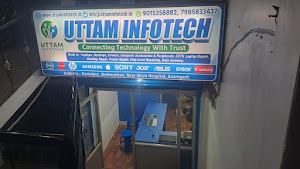
Our shop is at Kartalpur, Brahmshtan, near Shiva Hospital. If you can carry the printer, bringing it to the shop is usually the quickest way to have it checked.
For office printers, larger machines, or if you simply can’t get away, we also visit homes and offices within Azamgarh. Visits are by appointment, so please call or WhatsApp first with your location and the printer problem.
Not sure whether we cover your area? Just ask when you get in touch and we’ll let you know. Need help with a laptop or desktop too? See our computer repair service in Azamgarh.
FAQs
Printer repair questions, answered
Where can I get my printer repaired in Azamgarh?
Uttam Infotech is at Kartalpur, Brahmshtan, Near Shiva Hospital, Azamgarh. The shop is open Monday to Saturday, 10:00 AM to 8:00 PM. You can bring your printer in, or call 7985833437 to book a home or office visit.
Which printer brands do you repair?
We work on HP, Epson and Canon printers, including inkjet, ink tank, laser and all-in-one models. If you have a different brand, call or WhatsApp us with the model and we will tell you honestly whether we can help.
My printer is not printing. Can you fix it?
In most cases, yes. A printer that won’t print usually has a driver, connection, cartridge or paper-feed problem, which is often fixable. Some faults, like a damaged mainboard or printhead, may cost more to repair than the printer is worth. We will check it first and explain your options before any work is done.
How much does printer repair cost?
It depends on the fault and on whether any part needs replacing. A software or setup issue is very different from a hardware fault. After we inspect the printer, we tell you the estimated cost and only go ahead once you approve it.
Do you visit homes and offices?
Yes, home and office visits are available in Azamgarh by appointment. Call or WhatsApp us with your location and the printer problem to book a suitable time.
Can you fix paper jams and paper feed problems?
Yes. We remove stuck paper and torn pieces safely, then check the rollers, sensors and paper path so the jam doesn’t keep coming back.
Do you provide printer maintenance and cleaning?
Yes. Regular cleaning and servicing helps prevent jams, streaky prints and clogged printheads, especially for printers that are used heavily in offices or shops.
Can I send my printer problem on WhatsApp?
Yes. Message +91 7985833437 with your printer brand, model, the problem and, if possible, a photo of any error message on the screen. It helps us understand the issue before you visit or before we come to you.
How do I book a printer repair?
Call 7985833437, send a WhatsApp message, or fill in the enquiry form on this page. Tell us the printer brand, model and problem, and whether you want to visit the shop or book a home or office visit.
Contact
Book a printer repair in Azamgarh
Call or WhatsApp during working hours, or send the form and we’ll get back to you.
- Phone+91 79858 33437
- WhatsApp+91 79858 33437
- AddressUttam Infotech, Kartalpur, Brahmshtan,
Near Shiva Hospital, Azamgarh, Uttar PradeshOpen in Google Maps - HoursMonday – Saturday, 10:00 AM – 8:00 PM
Get a repair estimate
Fill in the details below. When you press the button, WhatsApp opens with your enquiry ready to send to us.