Refurbished Laptop Mein SSD Vs HDD
November 2, 2026

Location:
Kartalpur, Brahmshtan, Near Shiva Hospital, AzamgarhUrgent Need Support?


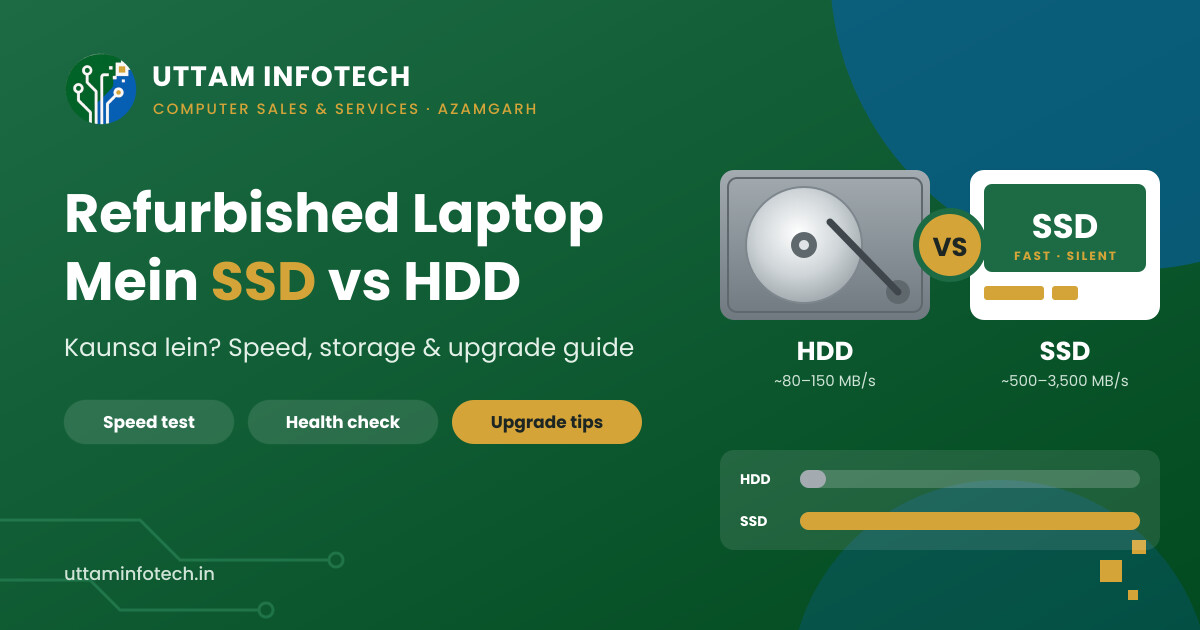
When customers come to us looking for a refurbished laptop, two machines often sit side by side at almost the same price. Same processor, same RAM, similar condition. One has a 1TB hard disk, the other has a 256GB SSD. Most people instinctively reach for the 1TB one, because bigger sounds better.
In most cases, that is the wrong choice.
The storage drive decides how fast your laptop starts, how quickly apps open, and how pleasant the laptop feels to use every single day. In a refurbished laptop, it also affects how long the machine stays reliable. This guide explains the real difference between SSD and HDD in simple terms, so you can buy with confidence.
For daily study, office work or online classes, choose a refurbished laptop with SSD (256GB or more). Pick an HDD laptop only if your budget is very tight and you plan to upgrade to SSD later.
HDD (Hard Disk Drive) stores data on spinning metal platters, read by a tiny moving arm. Most laptop HDDs spin at 5400 RPM, some at 7200 RPM. Because there are moving parts, the drive has to physically find your data before it can read it.
SSD (Solid State Drive) stores data on flash memory chips, with no moving parts at all. Data is accessed electronically, almost instantly.
In laptops, you will commonly see three types:
This is where the gap is biggest. A typical laptop HDD reads data at roughly 80–150 MB/s. A SATA SSD reaches around 500–550 MB/s, and an NVMe SSD can go several times higher than that.
Typical read speed (MB/s)
Approximate figures for common drives. Bars are drawn to scale.
But raw speed numbers do not tell the full story. The bigger difference is in access time, how quickly the drive responds to small requests. Windows constantly reads thousands of small files in the background. An HDD has to physically move its arm for each one; an SSD does not. That is why an older laptop with an HDD can feel slow even when the processor and RAM are decent.
In day-to-day use, this is what you will notice:
| Task | Laptop with HDD | Laptop with SSD |
|---|---|---|
| Booting Windows | Often a minute or more | Usually well under 30 seconds |
| Opening Chrome, Word, Excel | Noticeable wait | Opens almost immediately |
| Windows updates | Slow, laptop stays busy for long | Much quicker |
| Disk usage in Task Manager | Frequently stuck at 100% | Rarely a bottleneck |
| Multitasking | Stutters when switching apps | Smooth with enough RAM |
Actual timings vary with processor, RAM and Windows condition, but the pattern is consistent. Windows 10 and Windows 11 are designed with SSDs in mind, and on an HDD they often feel sluggish.
| Factor | SSD | HDD |
|---|---|---|
| Speed | ✓ Very fast | Slow |
| Moving parts | ✓ None | Spinning platters and arm |
| Shock resistance | ✓ Better – handles bumps well | Can be damaged by drops while running |
| Noise | ✓ Silent | Light whirring/clicking |
| Heat and power use | ✓ Lower, helps battery life | Higher |
| Weight | ✓ Lighter | Slightly heavier |
| Cost per GB | Higher | ✓ Lower |
| Common capacities in refurbished laptops | 128GB, 256GB, 512GB | 320GB, 500GB, 1TB |
| Failure warning | Usually gives fewer warning signs | Often gives signs (clicking, slowdowns, bad sectors) |
Capacity is the one area where HDD still wins on paper. For the same budget, an HDD gives you more space. The real question is whether you actually need that space inside the laptop.
A practical way to decide:
If you have a lot of movies, photos or backup data, an inexpensive external hard disk is a smart companion to an SSD laptop. You get speed for daily work and cheap bulk storage for files you rarely open.
In a new laptop, SSD is now standard. In a refurbished laptop, it matters even more, for a few reasons:
We have explained this in more detail in our article on why SSD is important in a refurbished laptop.
HDD is not useless. A refurbished laptop with HDD can still be reasonable if:
Buying an HDD laptop for daily study, office work or online classes and expecting it to feel fast. It will not, especially on Windows 11.
| Your use | Recommended storage |
|---|---|
| Students and online classes | 256GB SSD |
| Office work, billing, Tally, MS Office | 256GB–512GB SSD |
| Work from home, video calls | 256GB–512GB SSD |
| Programming and software development | 512GB SSD (NVMe if available) |
| Photo/video editing | 512GB–1TB SSD, plus external storage |
| Data storage only, very tight budget | HDD, with a plan to upgrade |
For almost every refurbished laptop buyer, the best storage option is an SSD. If you are choosing between a slightly better processor with an HDD and a slightly older processor with an SSD, the SSD laptop will often feel faster in real use. Pair it with sufficient RAM; our guide on how much RAM a refurbished laptop should have covers that.
Whether the laptop has an SSD or an HDD, the condition of the drive matters. Here is what to check:
Storage is only one part of the inspection. For the full process, use our complete refurbished laptop buying checklist.
If your current laptop is slow and has an HDD, you may not need a new one. If the processor is reasonably capable (for example, an Intel Core i3/i5 of 6th generation or newer, or a comparable AMD processor) and the body, screen and keyboard are in good shape, an SSD upgrade can give it a new life.
A typical SSD upgrade involves:
If you are comparing refurbished laptops in Azamgarh, ask the seller to show you the drive type and health on the spot, not just the specification sheet. A good dealer should be comfortable letting you check. If you already own a laptop with an HDD, ask about an SSD upgrade before deciding to replace it.
At Uttam Infotech, every refurbished laptop comes with a written warranty card. Here is how it applies to the storage drive:
| What | Cover | Key condition |
|---|---|---|
| SSD/HDD (laptop hardware) | 30 Days | Normal-use defects, from invoice date |
| Windows re-installation | 6 Months | Only if the originally installed Windows/software fails |
| Repair time | 7 Working Days | From submission, subject to parts availability |
You will check the laptop’s condition in front of us at delivery, including the drive type and health. After the 30-day period, drive repair or replacement is available as a paid service.
For a full breakdown of warranty terms, read why warranty matters in a refurbished laptop.
You can also read our guides on what a refurbished laptop is and whether buying a refurbished laptop is safe if you are buying for the first time.
Yes, for almost every user. SSD makes the laptop boot faster, open apps quicker and run Windows more smoothly. It also has no moving parts, which helps with reliability in an older laptop.
For most students, yes. Study material, MS Office, browser and online class apps fit easily. Use Google Drive or a pen drive for large videos and backups.
In most laptops, yes. Older laptops usually have a 2.5-inch bay, and many newer ones have an M.2 slot. The slot type needs to be checked first so the correct SSD is used.
Not if it is done properly. Data can be cloned to the new SSD or backed up and restored. Always take a backup before any storage upgrade.
For normal home, study and office use, a good-quality SSD typically lasts many years. Health tools like CrystalDiskInfo show how much of its rated life has been used.
If you use the laptop daily, choose the 256GB SSD. Add an external hard disk later if you need extra storage.
Some can. Laptops with an M.2 slot plus a 2.5-inch bay, or an optical drive bay with a caddy, can run Windows on SSD and store files on HDD.

Our skilled technicians are dedicated to restoring your devices to their optimal functionality.











Urgent Support?

© Uttam Infotech. All Rights Reserved by Uttam Infotech